Table of Contents
GoPro Hero 10 Black
Common operations
Dashboard (p.98) and Preferences (p.100)
- Rear touch screen ⇒ Swipe down ⇒ Dashboard
- Dashboard ⇒ Swipe left ⇒ Preferences
Format SD Card
- Preferences ⇒ Reset ⇒ Format SD Card
The filesystem used is exFAT for SD Card 64 GB or more, otherwise FAT32.
 WARNING: Some Android versions does not support reading exFAT filesystem via OTG USB.
Camera Beeps
- Dashboard ⇒ Camera Beeps icon ⇒ Enable/disable
- Preferences ⇒ General ⇒ Beep Volume
Screen Orientation
- Dashboard ⇒ Orientation Lock icon ⇒ Locked/All
Front Screen (p.16)
- Dashboard ⇒ Front Screen Settings icon ⇒ Full Screen/Actual Screen/Status Only/Screen Off
Shortcuts in capture screen
- Tap Capture settings ⇒ Pencil icon ⇒ Shortcuts
QuickCapture
If QuickCapture is enabled: with the camera off, press the shutter button; the camera turns on and starts recording immediately (lag 3 seconds). Pressing the shutter button again stops recording and the camera turns off.
- Dashboard ⇒ QuickCapture icon ⇒ Enable/disable
Lens
| SuperView | 16 mm |
|---|---|
| Wide | 16-34 mm |
| Linear | 19-39 mm |
| Linear + Horizon Leveling | 19-34 mm |
| Narrow | 27 mm |
Presets
Settings that are saved into the presets:
- Resolution, frame rate, digital lens type (RES, FPS and FOV).
- Digital zoom level
- HyperSmooth
- Shutter and Exposure
- ISO and White Balance
- Color and Sharpness
- Audio
- Bitrate
There are 5 pre-configured presets available, which you can customize to your liking. You can also add custom presets and give them one of 16 available predefined names (i.e. custom presets cannot be given custom names).
| Default presets | |
|---|---|
| Standard | 4K 30 Wide |
| Activity | 4K 60 SuperView |
| Cinematic | 5.3K 30 L+ |
| Ultra Slow-Mo | 2.7K 240 Wide |
| Basic | 1080 60 Wide |
| Names for additional custom presets | |
| Custom | |
| Air | |
| Bike | |
| Epic | |
| Indoor | |
| Motor | |
| Mounted | |
| Outdoor | |
| POV | |
| Selfie | |
| Skate | |
| Snow | |
| Trail | |
| Travel | |
| Water | |
| Looping | |
You can't hide or rename the stock, pre-configured presets. However, you can edit them and change the order in which they're listed.
Our presets
Si sono configurati 4 preset collocandoli nel seguente ordine.
| Motor | 2.7K 60 FPS, Wide HS High | Camera montata su motociletta, inquadratura fissa, ma con notevoli vibrazioni. |
|---|---|---|
| Standard | 2.7K 60 FPS, Linear HS Standard ISO Max 1600 | Camera impugnata a mano libera per riprese ambientali con possibilità di movimenti panoramici. Con ISO Max limitato è possibile modificare il valore EV per registrazioni ad esempio più scure. On-Screen Shortcut: Lens, Zoom, White Balance, EV. |
| POV | 2.7K 60 FPS, Wide HS Standard | Camera montata su zaino o cintura per inquadrature in ambiente circostante con FOV più ampio. |
| Basic | 1080 30 FPS, Linear HS High | Qualità ridotta per registrazioni di lunga durata. Con 30 FPS si hanno risultati migliori in condizioni di scarsa illuminazione. |
Le altre opzioni Protune sono quelle predefinite, uguali per tutti i preset:
| Opzioni Protune | |
|---|---|
| Digital Zoom On | No |
| White Balance | AUTO |
| Sharpness | MED |
| Color Mode | NATURAL |
| Exposure Type | AUTO |
| Auto ISO Max | 6400 |
| Auto ISO Min | 100 |
| Exposure Compensation | 0.0 |
| On-Screen Shortcuts | |
|---|---|
| Lower Left | Lens |
| Lower Right | Zoom |
| Upper Left | Slow-Motion |
| Upper Right | HyperSmooth |
To inspect from the Linux command line the camera settings that were active when recording a clip, you can use the exiftool tool:
exiftool -a -u -g1 GH010996.MP4
The tool can be used also to print only the tags we are interested in:
exiftool -u -p '$Filename | EIS: $ElectronicImageStabilization | GoPro_EISE: $GoPro_EISE' *.MP4
Stealth Mode
- Dashboard
- BEEPS: OFF
- FRONT SCREEN OPTIONS: SCREEN OFF
- Preferneces
- General
- LEDs: All Off
- Display
- Screen Saver Rear: 1 Min
- Brightness: 10%
Horizon leveling
GoPro10 red charging lights stays on for hours and then stays on even after unplugging
community.gopro.com: This can happen if you're charging your GoPro via a PC usb port or a USB hub. Your GoPro requires a constant 5V 2.4A charge, however PC ports and USB hubs usually have a variable output and can switch between power and data modes.
In realtà il problema si è presentato più di una volta con un normale caricatore USB.
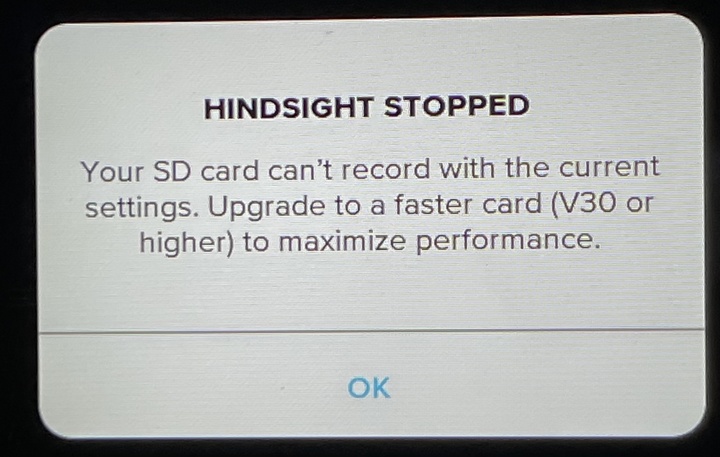
Does HindSight mode uses the SD card or RAM for buffering?
The GoPro support page does not give any information about that. Many speculated that the GoPro uses RAM (see here), but the following error message (from this post) may suggest otherwise: